No articles match “”.
Try fewer or different words.
Browse topics
Pages for people, companies, projects and topics
Each person, company, project and topic Jurnie remembers has a page that brings together what your meetings said about it.
Every person, company, project and topic in Jurnie's memory has a page: what your meetings said about them, what happened in meetings you missed, and how they connect to others.
Open a page
You open a page from a link:
- an underlined name in a meeting summary
- a dot in Connections (the Memory button on Home)
- a name in a pre-meeting brief
- a link in an answer from Ask Jurnie
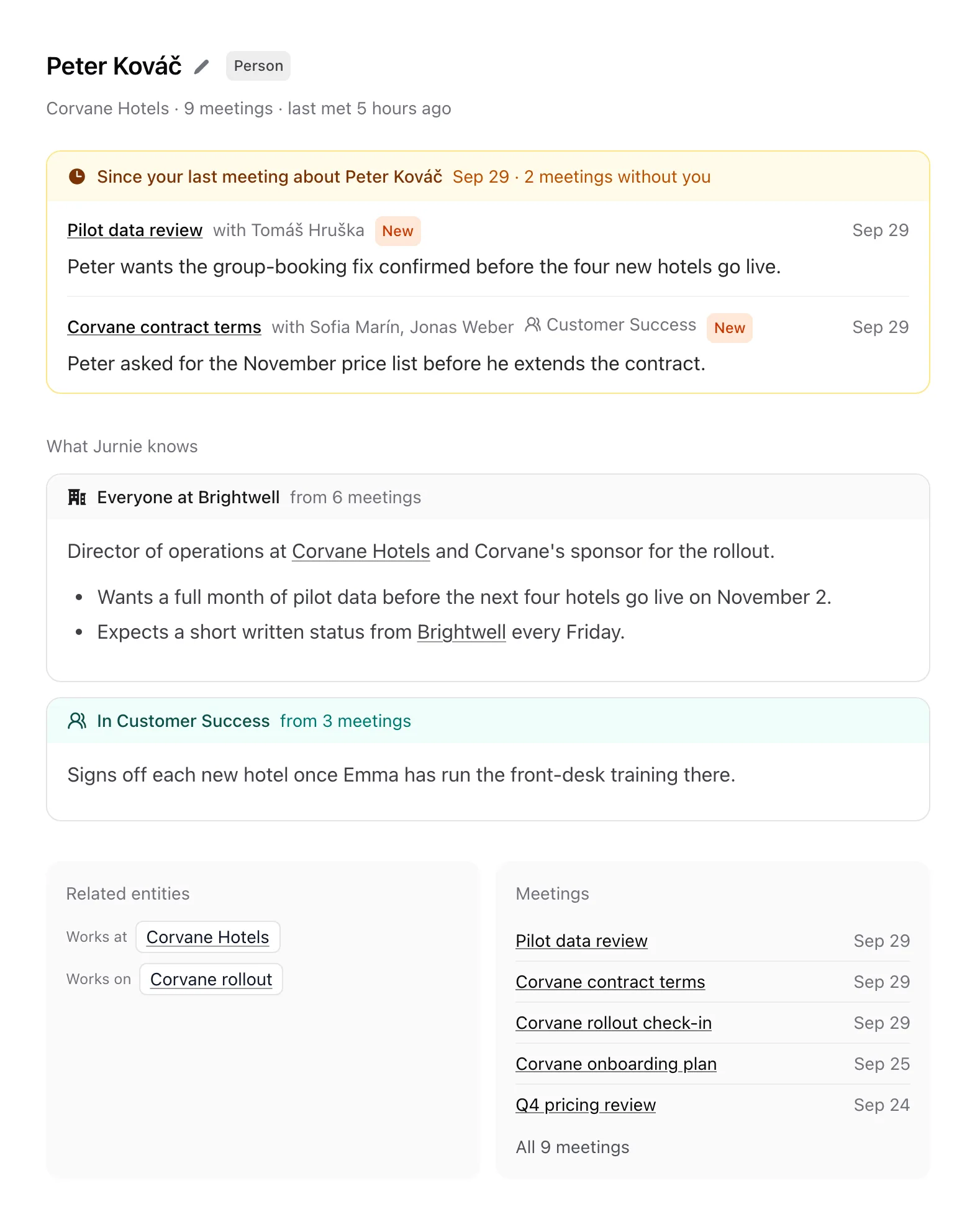
What's on the page
From top to bottom:
- The header. The name, its type (Person, Company, Project or Topic), where they work if Jurnie knows, how many of your meetings mention them, and when you last met. "Last met" means a meeting you were both in, so it only appears for people; otherwise the header says when they were last mentioned.
- Meetings you missed. Titled Since your last meeting about followed by the name: meetings about them that you can open but weren't in, held after the last one you were in. Each shows who was there and what was learned; ones that arrived since your last visit are marked New. If you've never been in a meeting about them, the section is called Meetings without you.
- What Jurnie knows. One card per audience, so you can tell where the text comes from and who else reads it: first the card named after your organization (Everyone at Brightwell, for example), then one for each of your teamspaces that knows them (In Customer Success). Each card says how many meetings it was written from. Long cards fold behind Show more.
- Connections. Who works where, who's on which project, and so on, grouped by relationship, such as Works at, Member of or Client of.
- Meetings. The five newest meetings that mention them. A link such as All 12 meetings expands the full list and shows what each meeting said about them. Use it to check where something came from.
- Notes from your meetings. At the bottom, behind a link such as 8 notes from your meetings: notes from meetings you can open that aren't part of the shared profiles, such as your private meetings or ones shared with you directly. Each is linked to its meeting.
Sections with nothing to show are left out.
Ask about them
The Ask Jurnie column on the right starts each new chat about them, so you can ask "What did we agree with them last month?" without naming them. Close it with Close Ask Jurnie and bring it back with Open Ask Jurnie. See Ask Jurnie about your meetings.
Something wrong?
Click the name to rename it, or see Rename, merge or correct what Jurnie remembers. To have what Jurnie remembers about a person deleted, an admin can email support@jurnie.ai.
Note: You only see the page for a person, company, project or topic if it comes up in at least one meeting you can open, and everything on the page comes from meetings you can open. See How Jurnie remembers.
Last updated October 3, 2026